
VRCKit Banwave Analysis and Audit
Introduction
Last Update: 2025-08-08 14:00 UTC
Note: This audit was conducted on version v0.2.4. Several issues identified in this report have been addressed in subsequent updates. Fixes are marked accordingly, and changes are summarized in the Errata section. Please read the full article.
On the 28.07.2025 VRC issued a banwave against a noticeable chunk of the user base of VRCKit. Most with the following message: 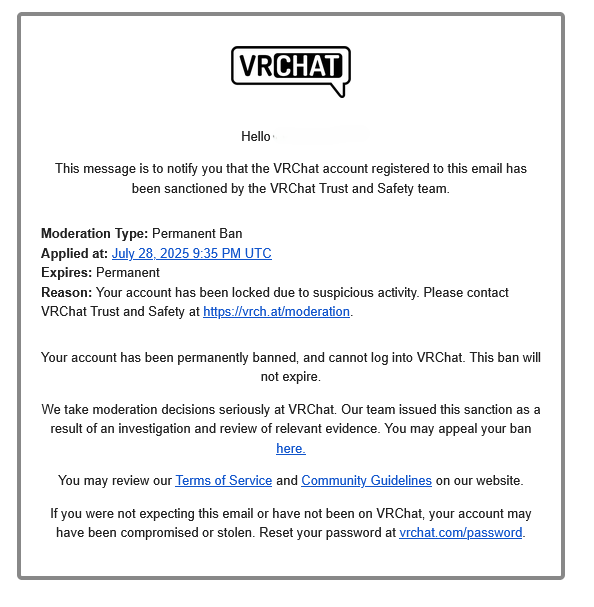 The ban wave raised concerns, especially when users began sharing support responses in the VRCKit Discord server that implied use of unwanted programs or malware:
 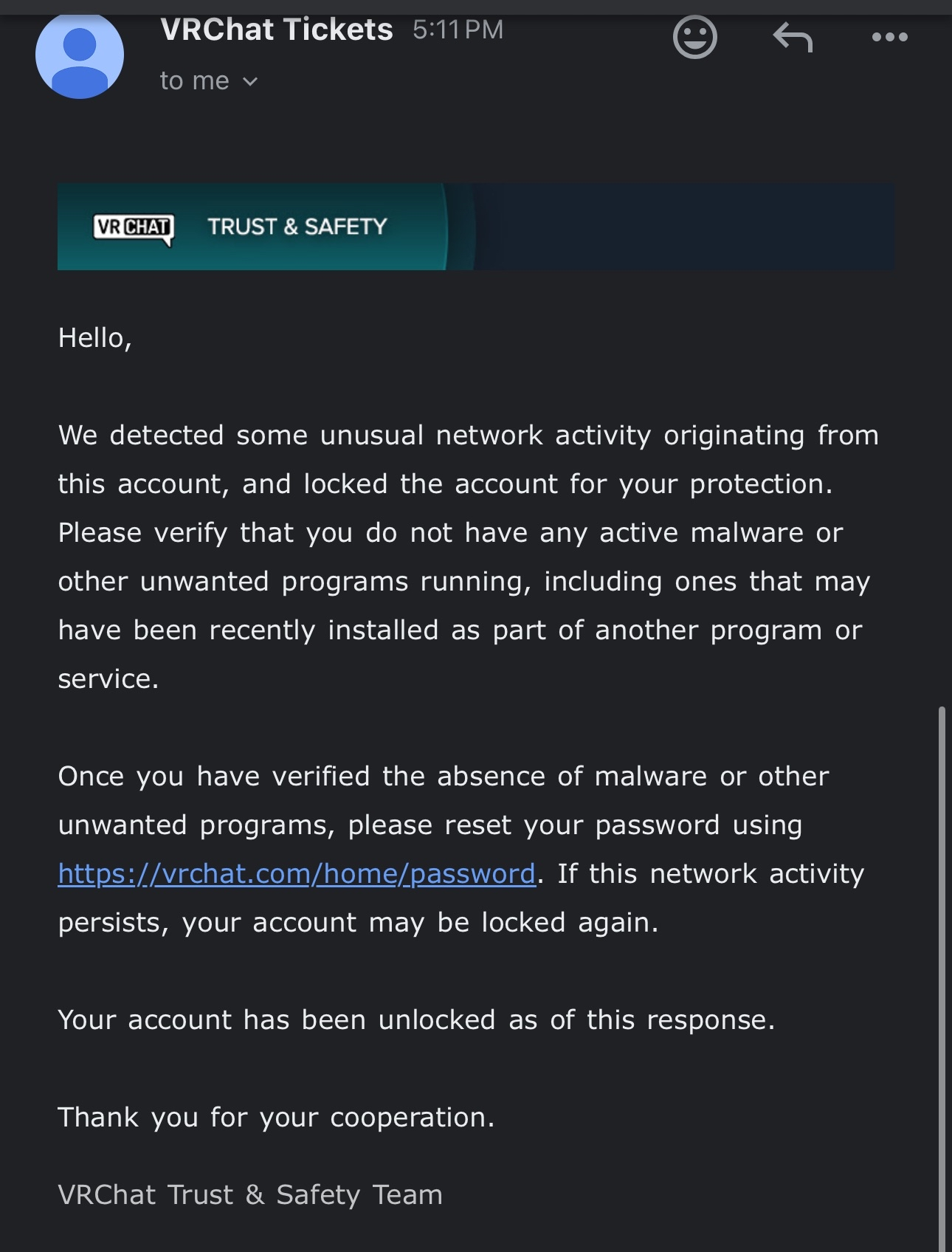 The specific wording of these responses, combined with the large number of affected VRCKit users, fueled speculation that the application was performing unauthorized actions in the background. In response, the developer temporarily suspended access to the application and the moderation team denied any wrongdoing, stating: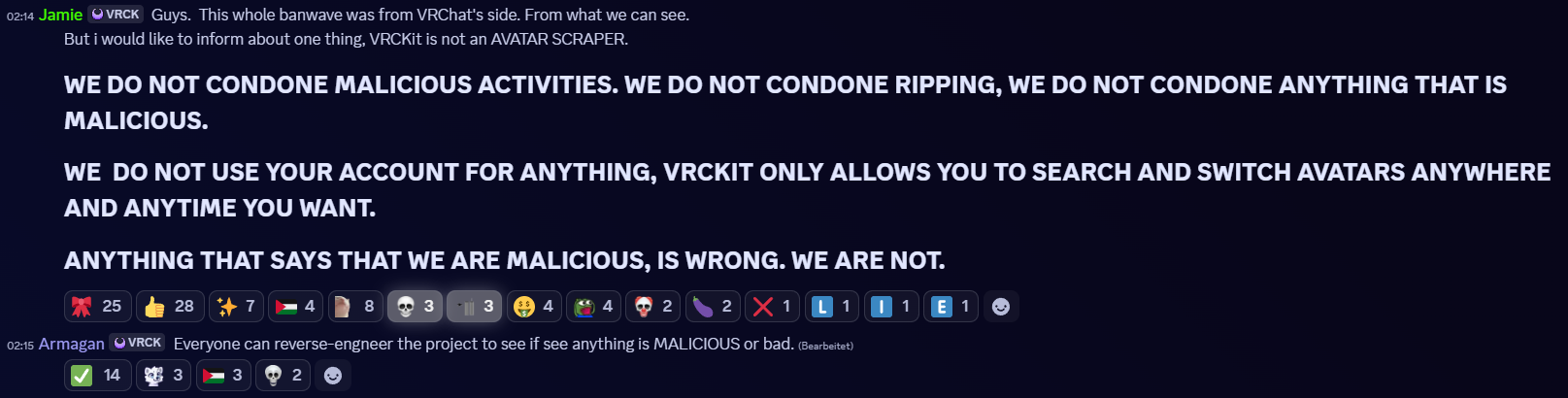
The developer also invited users to reverse-engineer the project to verify its integrity:
Everyone can reverse-engineer the project to see if anything is malicious or bad.
At the request of a non-technical friend, I undertook a static analysis of the application to investigate its behavior.
Scope
The objective was to assess the application against the following questions:
- Is VRCKit malicious? (e.g. RATs, trojans, token grabbers, botnets)
- Is VRCKit an avatar scraper? (i.e. does it collect avatar data automatically?)
- Are there any extended security or privacy concerns?
Out of scope:
- The VRCKit world
- Any external APIs not directly used by the application (e.g. VRCX endpoints)
A ZIP archive with the JavaScript source code used in version v0.2.4 (released on August 1, 2025) is included for reference. The app is distributed via GitHub: VRCKit Releases.
Only static analysis was performed, due to the lack of a verified user account.
Overview
VRCKit is an Electron-based companion app for VRChat (similar to VRCX), offering avatar management tools such as search, selection history, and collections. Additionally they provide a OSC chatbox templating engine (similar to VRCOSC). The application requires an Invite/Referral code and supports optional interaction with VRC through their API.
Behavior Findings
Usage of VRC User tokens to request avatar data
VRCKit actively monitors VRChat’s amplitude.cache and output_log.txt files and OSC events from the game directly. This technique allows it to detect when a user encounters a new avatar in-game. When an avatar ID is found in these files via a regular expression, the application initiates the following process:
- The application checks if the avatar’s metadata is already stored in its local database.
- If the avatar is new, VRCKit uses the user’s own VRChat authentication token to make an authorized API request to VRChat’s servers, fetching the avatar’s metadata.
- The retrieved metadata (name, author, description, tags, performance stats, etc.) is stored in a local cache.
- Finally, this collected metadata is sent via a PUT request to VRCKit’s central backend server, adding it to a public database.
This entire process occurs in the background without any direct user interaction or notification.
This is now mentioned in the Privacy Policy that users have to accept. See Errata
You can find annotated code by clicking here
class cache_scanner {
  // *snip* - removed for brevity

  // Initializes the cache scanner once the application loads.
  // Sets up listeners for VRChat log and cache files and processes avatar IDs as they appear.
  async init() {
    // Resolve the path to the amplitude.cache file
    const cache_path = await this.systems.api.config.get(
      "VRChatAmplitudeCachePath",
      path2.join(process2.env.APPDATA, "../VRChat/VRChat/amplitude.cache")
    );

    // Resolve the path to the VRChat log directory
    const log_path = path2.join(
      process2.env.APPDATA,
      "../LocalLow/VRChat/VRChat"
    );

    this.systems.api.logger.info("CacheScanner", "Starting cache scanner.");

    // Create a task queue to process avatars sequentially
    this.queue = new C17({
      concurrency: 1
    });

    const avatar_id_regex = this.systems.api.constants.AvatarIdRegex;

    // Watch for changes in the log and cache files
    this.watcher = chokidar.watch([cache_path, log_path], {
      ignoreInitial: true,
      depth: 1
    });

    this.watcher.on("all", async (action, path) => {
      if (action === "add" || action === "change") {
        if (await this.systems.api.vrchat.auth.isLoggedIn()) {
          // Read the file line by line
          lineReader2.eachLine(
            path,
            { bufferSize: 1024 },
            async (line, p1718 /* unused */, resolve) => {
              var queue;
              for (const match of line.matchAll(avatar_id_regex)) {
                const avatar_id = match[0];
                if ((queue = this.queue) != null) {
                  // Add the processing task to the queue
                  queue.add(async () => {
                    await this.handleNewAvatar(avatar_id);
                    // Wait a random delay between 1 and 5 seconds
                    await new Promise(resolve =>
                      setTimeout(resolve, vF523(100, 500))
                    );
                  });
                }
              }
              if (resolve != null) {
                resolve();
              }
            }
          );
        }
      }
    });
  }
  // *snip* - removed for brevity
}

const valid_platforms = ["standalonewindows", "android", "ios"];
const internal_mapping = {
  standalonewindows: "StandaloneWindows",
  android: "Android",
  ios: "IOS"
};

// Processes a single avatar ID: fetches metadata, caches it, and sends it to the server.
// check_database: ????
// skip_cache: whether to skip updating the local cache.
async handleNewAvatar(
  avatar_id /*p1721*/,
  check_database = false /*p1722*/,
  skip_cache = false /*p1723*/
) {
  // Check whether the avatar is already cached, unless skip_cache is true.
  if (
    !(skip_cache
      ? false
      : await this.systems.api.database.avatars.has(avatar_id)) ||
    check_database
  ) {
    // Fetch avatar metadata from VRChat
    const fetched_avatar_from_vrchat =
      await this.systems.api.vrchat.avatars.fetch(avatar_id);

    // Ensure we have valid data with unity_packages
    if (
      fetched_avatar_from_vrchat != null &&
      fetched_avatar_from_vrchat.unity_packages
    ) {
      // Parse the list of platforms (PC, Android, iOS)
      const parsed_platforms = new Map();
      fetched_avatar_from_vrchat.unity_packages.forEach(package => {
        if (
          package.platform &&
          valid_platforms.includes(package.platform) &&
          package.performanceRating
        ) {
          const internal_variant = internal_mapping[package.platform];
          parsed_platforms.set(internal_variant, {
            platform: internal_variant,
            performance: package.performanceRating || "None"
          });
        }
      });

      // Retrieve cached avatar if applicable
      const cached_avatar = skip_cache
        ? null
        : await this.systems.api.database.avatars.get(avatar_id);

      // Construct the object to cache and send to the server
      const to_be_stored_avatar = {
        id: avatar_id,
        name: fetched_avatar_from_vrchat.name,
        author_id: fetched_avatar_from_vrchat.author_id,
        author_name: fetched_avatar_from_vrchat.author_name,
        image_url: fetched_avatar_from_vrchat.image_url,
        description: fetched_avatar_from_vrchat.description,
        tags: fetched_avatar_from_vrchat.tags.join(", "),
        avatar_created_at: fetched_avatar_from_vrchat.created_at,
        avatar_updated_at: fetched_avatar_from_vrchat.updated_at,
        updated_at: new Date().toISOString(),
        created_at:
          (cached_avatar == null
            ? undefined
            : cached_avatar.created_at) ?? new Date().toISOString(),
        platforms: [...parsed_platforms.values()]
          .map(value => `${value.platform}: ${value.performance}`)
          .join(", ")
          .trim()
      };

      // Save avatar to local cache if not skipping
      if (!skip_cache) {
        await this.systems.api.database.avatars.put(to_be_stored_avatar);
      }

      const local_avatar_count = await this.systems.api.database.avatars.count();
      this.systems.api.logger.info(
        "CacheScanner",
        `Added new avatar: ${avatar_id}! Total avatars: ${local_avatar_count}`
      );

      // Emit event
      if (!check_database) {
        this.systems.api.events.emit(
          "CacheScanner;NewAvatar",
          to_be_stored_avatar
        );
      }

      // Upload avatar to the central server
      await this.putAvatarToServerDirectly(to_be_stored_avatar);
    }
  }
}

// Sends avatar data directly to the remote server after resolving the CDN URL
async putAvatarToServerDirectly(avatar) {
  // Use HTTP HEAD to resolve the CDN URL
  const s3_url = await this.systems.api.vrchat.fetch({
    method: "HEAD",
    url: avatar.image_url
  });

  // Upload avatar metadata to VRCKit server
  await this.systems.api.vrckit.avatars.put({
    id: avatar.id,
    author_id: avatar.author_id,
    author_name: avatar.author_name,
    image_file_url: s3_url.url,
    name: avatar.name,
    description: avatar.description,
    tags: avatar.tags,
    avatar_created_at: avatar.avatar_created_at,
    avatar_updated_at: avatar.avatar_updated_at,
    platforms: avatar.platforms
  });

  this.systems.api.logger.info(
    "CacheScanner",
    `Sent avatar to server: ${avatar.id}`
  );
  return true;
}

// This class provides an interface for uploading avatar metadata to VRCKit
let vrckit_avatar = class {
  constructor(vrckit) {
    this.vrckit = vrckit;
  }

  // Sends avatar metadata using a PUT request
  async put(avatar_data) {
    return (
      await this.vrckit.fetch({
        method: "PUT",
        url: "/avatars",
        data: avatar_data
      })
    ).data;
  }
};

// Handles authenticated API calls to the VRCKit server
class vrckit_api {
  // *snip* - removed for brevity
  async fetch(fetch_options) {
    // Retrieve stored auth token
    const vrckit_token = await this.auth.getAuthToken();
    if (!vrckit_token) {
      throw new Error("Not logged in");
    }

    // Attach Authorization header
    fetch_options.headers = {
      Authorization: vrckit_token,
      ...(fetch_options.headers || {})
    };

    // Default base URL if not set
    fetch_options.baseURL ||= this.api.constants.VRCKitApiBaseUrl;

    // Make the HTTP request
    return this.api.http.fetch({
      ...fetch_options,
      side: "Client"
    });
  }
  // *snip* - removed for brevity
}

// These classes handle the interaction with VRChat's API
let auth = class {
  constructor(r) {
    this.vrchat = r;
  }

  // Starts the first step of login and retrieves the authentication cookie
  async loginStep1(username, password) {
    // Make login request
    const i = await this.vrchat.api.http.fetch({
      method: "GET",
      url: "/auth/user",
      baseURL: this.vrchat.api.constants.VRChatApiBaseUrl,
      headers: {
        "User-Agent": this.vrchat.userAgent,
        Authorization: `Basic ${Buffer.from(
          `${username}:${password}`
        ).toString("base64")}`
      },
      side: "Server"
    });

    // Parse auth cookie
    const u =
      Dp.parse(i.headers["set-cookie"] ?? "").find(f => f.name === "auth");

    if (!u) throw new Error(`Failed to login: ${JSON.stringify(i.data)}`);

    // Save account info including auth cookie
    await this.vrchat.api.config.vrchatAccounts.updateAccount({
      username: username,
      display_name: i.data.displayName,
      auth_cookie: {
        value: u.value,
        expires_at: u.expires.getTime()
      },
      two_factor_auth_cookie: void 0
    });

    // Set this account as the active account
    await this.vrchat.api.config.vrchatAccounts.setSelectedAccount(r);

    return {
      auth: {
        value: u.value,
        expires: u.expires
      },
      nextStep: (i.data.requiresTwoFactorAuth ?? []).map(f => f.toLowerCase())
    };
  }

  // Retrieves the full auth cookies for the current account
  async getAuthCookies() {
    const r = await this.vrchat.api.config.vrchatAccounts.getSelectedAccount();
    return (r && r.full_cookie) || null;
  }

  // *snip* - removed for brevity
};

let avatar = class {
  constructor(r) {
    this.vrchat = r;
  }

  // Loads an avatar's metadata from VRChat by ID
  async fetch(avatar_id) {
    const e = await this.vrchat.fetch({
      method: "GET",
      url: `/avatars/${avatar_id}`,
      responseType: "json"
    });

    // Return null if avatar does not exist
    if (e.status === 404) return null;

    const i = e.data;

    // Return null for non-public i.e. marketplace avatars
    return (i == null ? void 0 : i.releaseStatus) !== "public"
      ? null
      : {
          author_id: i.authorId,
          author_name: i.authorName,
          created_at: i.created_at,
          description: i.description,
          image_url: i.imageUrl,
          name: i.name,
          release_status: i.releaseStatus,
          featured: i.featured,
          tags: i.tags,
          thumbnail_image_url: i.thumbnailImageUrl,
          id: i.id,
          updated_at: i.updated_at,
          version: i.version,
          unity_packages: i.unityPackages
        };
  }
};
Transmission of the currently selected avatar ID
Everytime an avatar is selected by a user that has logged in with VRChat, that avatar ID is communicated to VRCKit via a PATCH request to https://api.vrckit.com/users/@me that looks like this:
{ "selected_avatar_id": "avtr_03000200-0400-0500-0006-000700080009" }This also happens directly after when a user logs into VRChat and on each start of the application.
This is now mentioned in the Privacy Policy that users have to accept. See Errata
You can find annotated code by clicking here
class hk {
	// *snip* - removed for brevity
	async selectAvatar(r, e = !1) {
		this.api.toast.info('Selecting avatar...');
		try {
			return (
				await this.api.vrchat.avatars.select(r),
				await this.api.vrckit.users.current.patch({
					selected_avatar_id: r,
				}),
      // *snip* - removed for brevity
			);
		} catch (i) {
			return (
				this.api.toast.error('Failed to select avatar', {
					description: `${i}`,
				}),
				!1
			);
		}
	}
}
Security Findings
Plaintext Passwords sent on Registration and Login
When the user authorizes or registers the password that is used is transmitted in plaintext like this:
// login
{"email":"blog@qrtz.moe","password":"i_am_not_hashed"}
// register
{"email":"blog@qrtz.moe","password":"i_am_not_hashed","display_name":"qrtz","reference_id":"i_didnt_get_one"}
While HTTPS encrypts data in transit, the lack of client-side hashing means the server receives the raw password. The FAQ claims passwords are stored using bcrypt, but this cannot be verified without a backend audit.
This was partially adressed in v0.3.3-dev.2. See Errata
Deviations from Electron Security Best Practices
The following section lists deviations from the recommended security settings / practices that are outlined in the Electron security tutorial. It is important to note that these findings do not constitute direct vulnerabilities. Rather, the identified features serve as safeguards against zero-day vulnerabilities and potential implementation errors by the developers of third-party libraries on which the application relies.
Loading untrusted code from a remote server
The application was designed to load and execute its core logic directly from a remote server (https://vrckit.armagan.rest) every time it starts. This is an extremely dangerous practice that is explicitly advised against by Electron’s security guidelines, as it grants the developer the ability to execute arbitrary code on every user’s machine at any time.
This was addressed in version v0.3.0. See Errata.
Disabled Electron Security Features
The app disables both contextIsolation and webSecurity:
contextIsolationprevents the renderer (browser UI) from accessing privileged APIs.webSecurityblocks unauthorized cross-origin requests.
webSecurity was tried to be mitigated in version v0.3.1. See Errata.
sender of IPC messages not validated
Every Web Frame can send IPC request, also untrusted ones like iframes and child windows. Each IPC should be validated to be from the allowed sources. That means if the browser context would a non-node context, this could allow access to node apis via an XSS vulnerability.
Potential Vulnerability: Unvalidated Data Sent to Avatar Endpoint
Collected avatar metadata (name, author, performance stats, etc.) is sent to VRCKit’s backend. The PUT logic does not appear to validate this data locally before sending, and it is unclear whether the backend performs validation.
If no backend-side validation exists, this could be abused to inject invalid or fabricated metadata into VRCKit’s database.
Conclusion
Is VRCKit malicious?
No evidence of traditional malware (e.g., remote access tools, trojans, token grabbers, botnets) was found in build v0.2.4. The application does, however, use the logged-in user’s VRChat authentication token to perform automated API requests for avatar metadata. This occurs without prominent in-app disclosure or an explicit consent mechanism. While this behavior does not match the common definitions of malicious software, it may be considered outside user expectations if not clearly communicated.
This is now mentioned in the Privacy Policy that users have to accept. See Errata
Is VRCKit an Avatar Scraper?
Yes. VRCKit monitors VRChat log and cache files for avatar IDs, uses the user’s authentication token to retrieve avatar metadata via the official VRChat API, and uploads this metadata to a remote server.
This is now mentioned in the Privacy Policy that users have to accept. See Errata
Are there any extended security or privacy concerns?
Yes. The following were identified:
- Closed Source: The application is closed-source, which makes independent verification of current and future versions more difficult.
- Unhashed Passwords: Passwords are sent to the server in plaintext form over HTTPS. While HTTPS encrypts the connection, this means the raw password is available to the server. If users reuse credentials between VRCKit and VRChat, this could increase account risk.
- Metadata Upload: Avatar metadata is stored locally and also uploaded to the VRCKit backend. This includes the currently selected avatar ID when logging in or selecting an avatar.
- User Consent: Users are not explicitly prompted to agree to avatar metadata uploads.
- Disabled Security Mechanisms: Certain Electron security settings are disabled, which could increase exposure to vulnerabilities if other protections fail.
It is plausible that the automated API requests using user tokens were detected by VRChat and contributed to the reported banwave, but no direct confirmation of this has been observed.
Observations on Transparency and User Communication
The analysis confirms that VRCKit collects avatar metadata from VRChat logs and cache files, then uses the user’s own authentication token to fetch and upload this data to its backend. This activity is not prominently disclosed in the application’s interface and is mentioned only briefly in the FAQ. The description provided there omits critical details, such as the fact that the user’s account is actively involved in these API requests, and does not offer an in-app method to disable the process aside from avoiding login entirely.
A message from the VRCKit moderation team in Discord states that the application is not an avatar scraper and that tokens are only used for avatar selection. This statement is factually inaccurate based on observed behavior. The application does scrape avatar data and uses the user’s authentication token to do so. Given the precision of the implementation and the level of integration, it is unlikely that this discrepancy is due to a lack of awareness. Such a direct contradiction between public statements and actual functionality significantly undermines trust, especially for software that requires full account credentials.
The service’s premium subscription model offers enhanced search results, the value of which depends on the size and recency of the avatar database. Because part of this database is populated through undisclosed, automated collection, the absence of a clear Privacy Policy and Terms of Service is not just a documentation gap. It is an ethical concern. Users are contributing data that is later monetized without a fully informed choice or a binding agreement that outlines how the data will be used, stored, or retained.
A privacy policy and Terms and conditions are available as of v0.3.3-dev.2. See Errata
The current creator opt-out mechanism, which requires the inclusion of a VRCKitBlocked keyword in avatar descriptions, is not neutral. It obligates creators to reference the very platform they are trying to avoid. A generic opt-out tag (e.g., [private] like Prismic’s avatar search world is using) would achieve the same technical effect while respecting the creator’s preference not to promote the tool.
Avatars containing the word private in the description or name are now not displayed on the search. v0.3.3-dev.1 See Errata
Any closed-source application that requests VRChat credentials carries inherent security and privacy risks, as these credentials grant full account access, including to private avatars and the complete friends list. Established projects like VRCX and VRCAA address this risk by making API-interacting code open-source. VRCKit does not. Given that no alternative authentication flows are available to non-partnered developers, the only way to reduce this risk without open-sourcing is to remove features that require users to supply their VRChat credentials entirely.
VRCKit is now open source
Recommendations for improving transparency and trust:
- Require explicit opt-in before uploading discovered avatar data.
- Provide clear, accessible, and accurate communication, in-app and in the FAQ, that the user’s authentication token will be used to fetch and upload avatar metadata.
- Adopt a neutral, non-branded opt-out keyword for creators.
- Implement Electron security safeguards or document the reasoning for disabling them.
- Either open-source the components that handle VRChat API interaction or remove any features that require VRChat credentials.
- Apply client-side password hashing before transmission to the server.
- Present users with a Privacy Policy and Terms of Service during registration, and require acceptance before proceeding.
Until these measures are implemented, VRCKit will continue to operate with a transparency deficit and ethical concerns that place both its users and the platform’s reputation at risk.
Edit: After requesting a comment from the developer, they agreed to implement the recommended proposals. I will update the post once I have verified their implementation.
Errata
While conducting the audit, preliminary findings were communicated to the developer. This resulted in partial changes in later versions. These changes address some technical risks, but they do not resolve the transparency and ethical concerns documented above.
v0.3.0
The application no longer loads its core logic directly from a remote server (vrckit.armagan.rest). Instead, it now installs a local Node runtime and starts a local process to host the site.
Impact: This removes the most direct risk of arbitrary code execution from a remote source, but the application remains closed-source, so users must still trust that the hosted code does not change without their knowledge.
v0.3.1
The developer introduced Content Security Policy (CSP) headers, but they are applied only to static assets and not to the main HTML document. According to Mozilla’s guidance, CSP must be applied to all responses to be effective.
Impact: As implemented, the CSP offers no meaningful protection against script injection attacks. This change appears incomplete and does not address the underlying security concerns raised in the audit.
v0.3.3-dev.1
Avatars marked with the word private in either the description or name are now not shown in the search.
v0.3.3-dev.2
A
Legal documentaion can now be found on VRCKit’s website.
These documents are also presented to users inside the application, and acceptance is mandatory to continue using VRCKit. 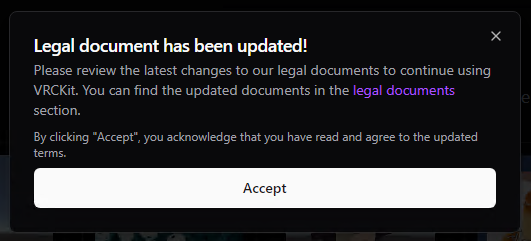
Impact: The addition of formal legal documents is an important step toward clarity for users. The Privacy Policy now specifies that VRCKit uses the VRChat authentication token to fetch avatar metadata. Though the avatar gatering process is still automatic and not opt-in.
B
The password, which is sent to VRCKit is now hashed with SHA-256.
Impact: While a good first step, the hash is not salted and the same passwords result in the same hash. While I have been shown server code, which salts the users password, it does not appear to be used here.